How to Use the Sydon PPC Audit Workbook
The Sydon PPC Audit Workbook is the Excel companion to the PPC Audit Template PDF. Paste your Search Term Report in once, and it classifies every search term into what's working, what's bleeding, and what's ready to promote. This walks through the whole thing end to end, using a real test run.
You know you're wasting ad spend. The question is where.
The Sydon PPC Audit Workbook is the Excel companion to the PPC Audit Template PDF. Paste your Search Term Report in once, and it classifies every search term into what's working, what's bleeding, and what's ready to promote, no formulas to write, no manual sorting. This walks through the whole thing end to end, using a real test run so you can see exactly what comes out the other side.
Don't have the workbook yet? Grab the free PDF and Excel workbook at go.sydon.ai/ppc-audit, then come back here for the walkthrough.
What's in the download
Two files, delivered together: the PDF, which is the 10-module audit system with the checks, formulas, and scoring rubric for a full manual account review, and the workbook, which is the part that does the search-term-level math for you.
The workbook has seven tabs. Only one of them asks you to do anything.
Step 1: Get your Search Term Report
Open Amazon Ads Console and go to Campaign Manager, Measurement and Reporting, Sponsored ads reports. Create a report: Sponsored Products, report type Search term, time unit Summary, last 30 or 60 days. Download it.
This is a standard report every Sponsored Products advertiser has access to, nothing paid, nothing gated.
Step 2: Paste it into PASTE DATA
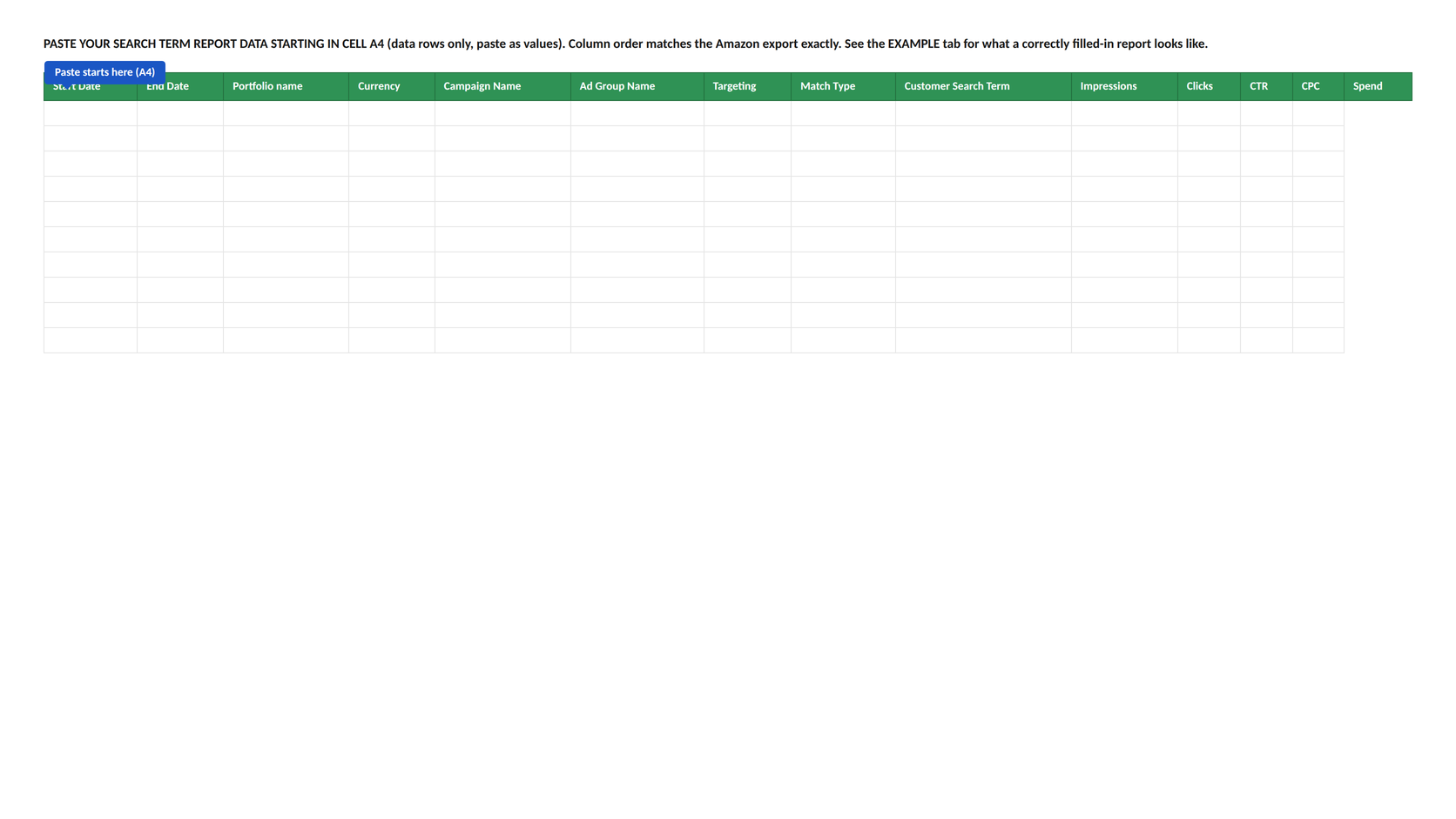
Open the workbook. The PASTE DATA tab is empty on purpose: there's no sample data sitting in it waiting to get mixed up with yours.
Select every data row in your downloaded report (not the header row), copy, and paste as values starting at cell A4. Column order matches Amazon's export exactly, so it's one paste, not a manual remap.
If you want to see what a correctly filled-in report looks like before you paste your own, check the EXAMPLE tab. It's a static reference, not connected to any formula, so there's no risk of it contaminating your numbers.
Step 3: Set two inputs on ACCOUNT SUMMARY
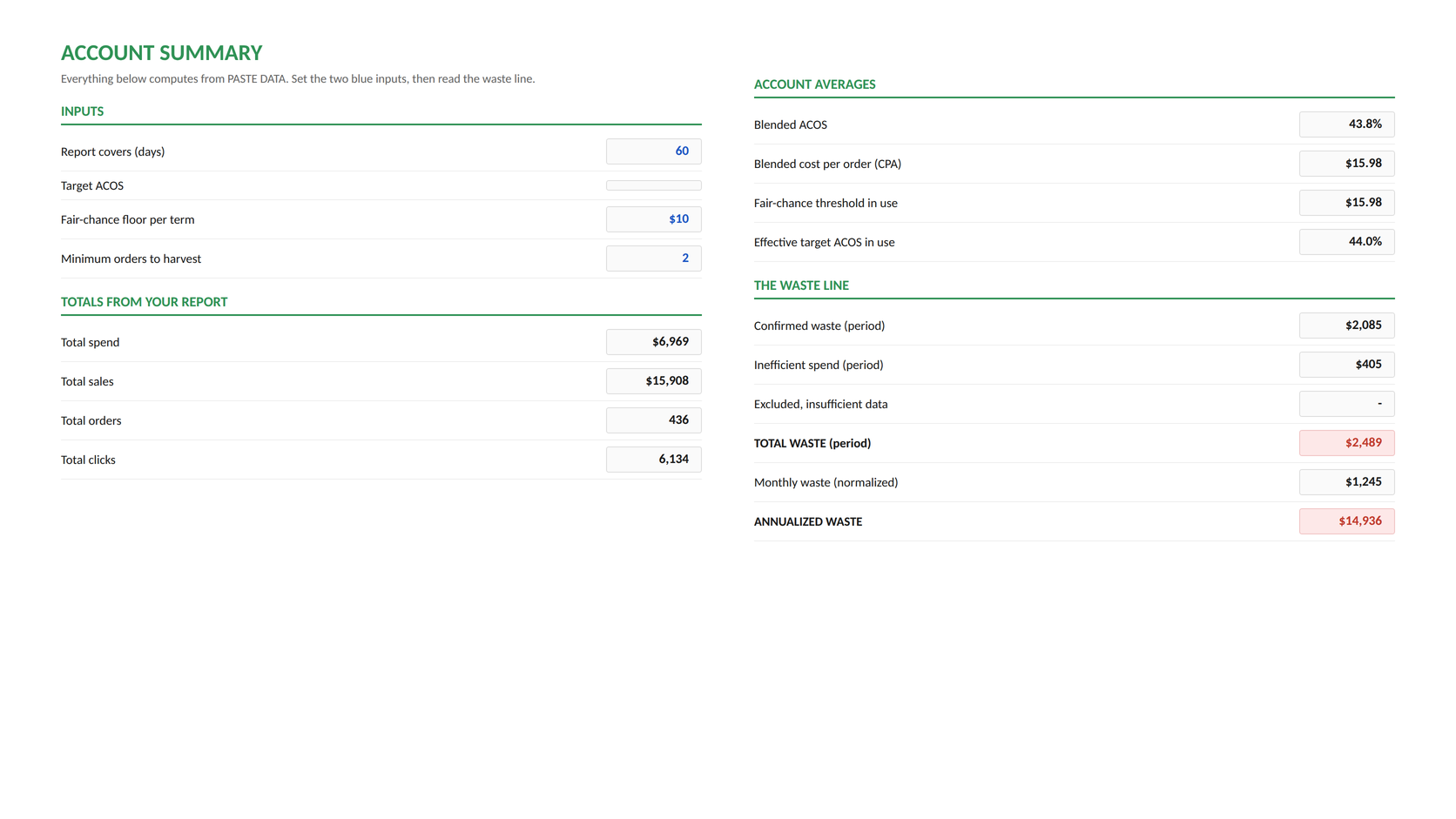
Everything past this point computes automatically. You only touch two cells, both in blue: Report covers (days), 30 or 60, matching what you pulled, and Target ACOS, your profitability line. Leave it blank and it defaults to your account's own blended ACOS.
Here's what that produced on a real 60-day test report we ran through it:
$6,969 in total spend. $2,489 wasted, a 35.7% waste rate. That's not a hypothetical; that's the workbook doing real arithmetic on a real (test) report the moment the two inputs were set.
Step 4: Read WASTE AUDIT
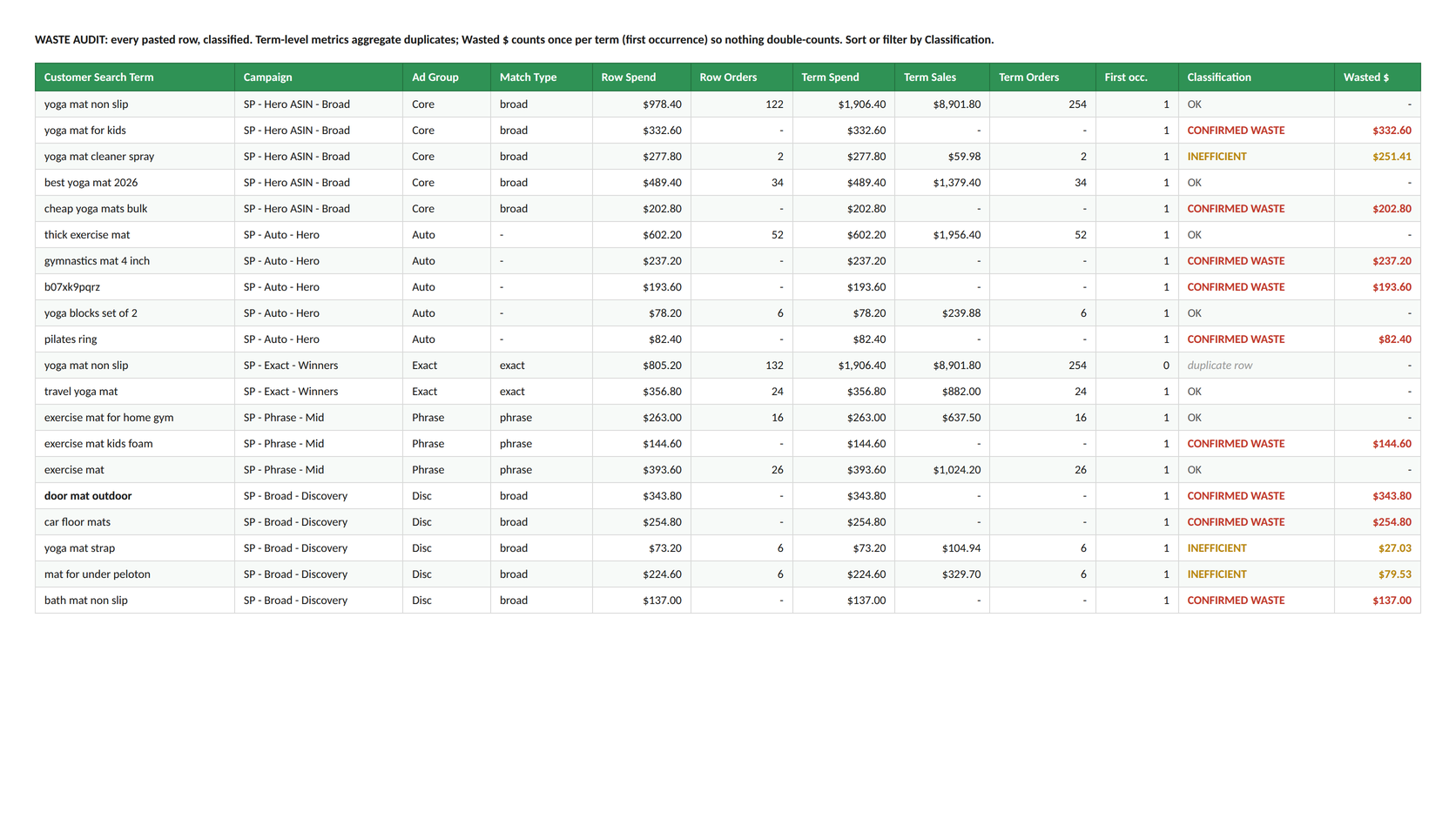
This is every search term from your report, classified. Confirmed waste, inefficient spend, or fine, no manual sorting required.
In our test run, "door mat outdoor" spent $343.80 across 60 days with zero orders, flagged CONFIRMED WASTE, the exact dollar figure carried straight through from the pasted report. "Yoga mat cleaner spray" converted twice but ran at 463% ACOS, flagged INEFFICIENT, with only the excess spend above target counted as waste, not the whole line.
Step 5: Work NEGATIVES into Ads Console
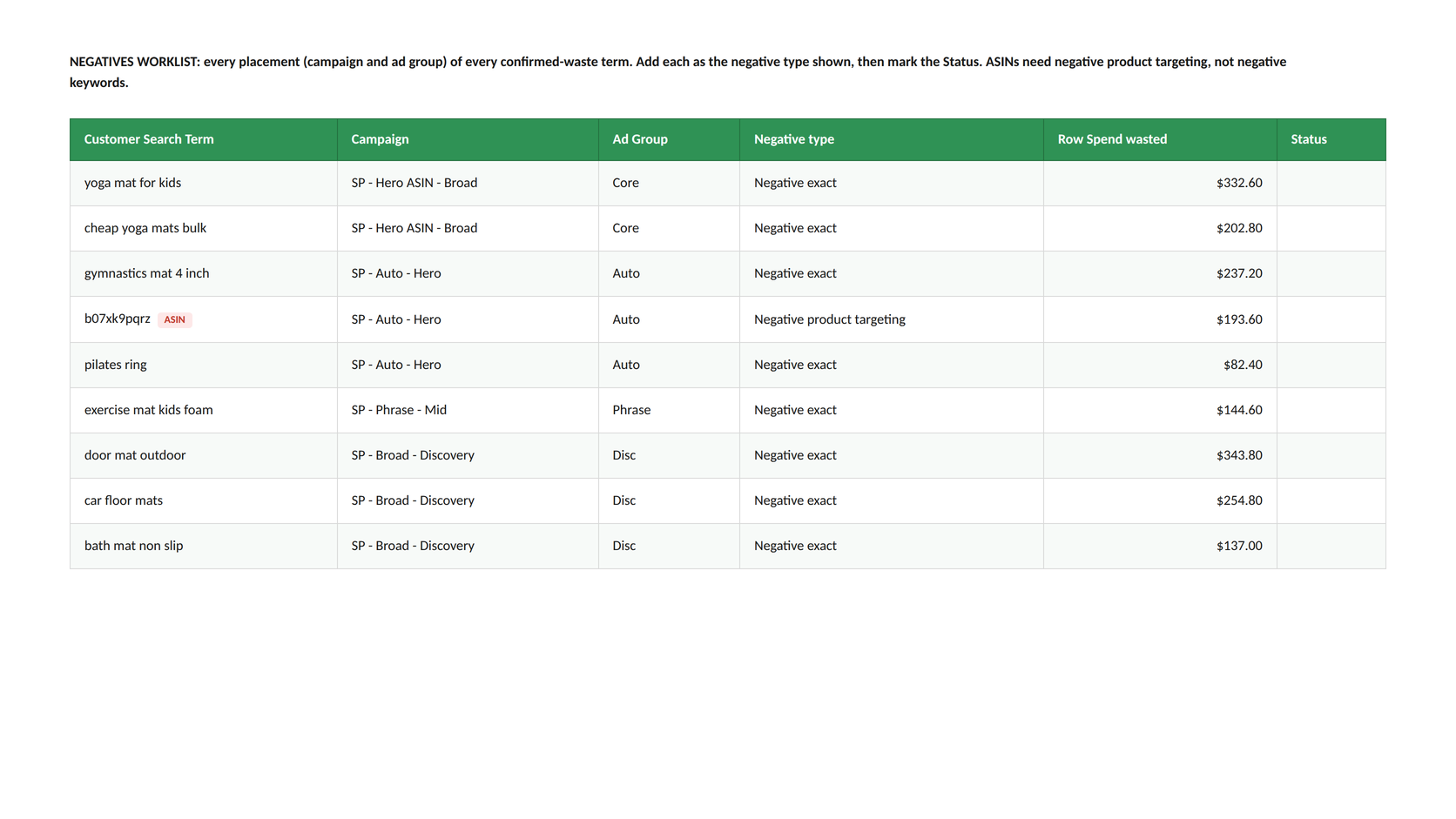
Every confirmed-waste term, with the negative type already decided for you.
Notice the two ASIN-looking terms, "b07xk9pqrz" and "b09fj2klmn", are correctly routed to Negative product targeting, not negative keywords. A negative keyword against an ASIN does nothing; the tab catches that distinction automatically so you don't add a negative that silently fails.
Step 6: Promote winners from HARVEST
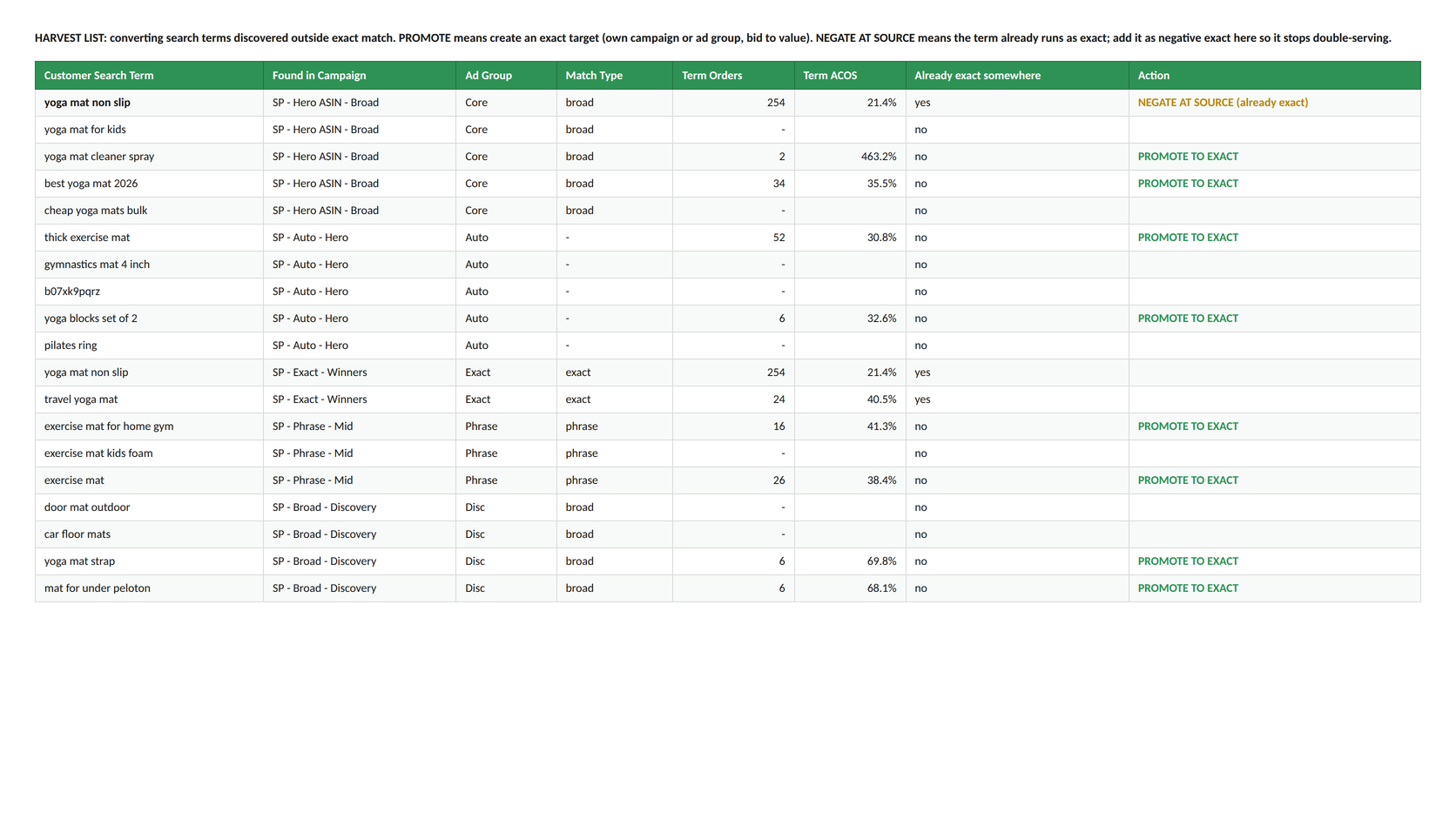
This is the one the free Calculator doesn't do: finding converting terms stuck in broad, auto, or phrase that deserve their own exact target.
In the test data, "yoga mat non slip" was running in both a broad campaign and an exact campaign simultaneously, converting well in both, which means the account was bidding against itself. The HARVEST tab caught it and flagged NEGATE AT SOURCE (already exact): move that demand fully to the controlled exact target instead of paying discovery prices for traffic you've already discovered. Six other terms were flagged PROMOTE TO EXACT, converting, but with no exact target yet.
What this doesn't do
The workbook computes the search-term-level math: waste, negatives, and harvest. It doesn't score campaign structure, placement performance, or branded-vs-non-branded split, those are judgment calls, not spreadsheet formulas, and they live in the PDF's 10-module scorecard instead. Run those manually against the PDF once you've worked through the workbook.
Common questions
Do I need to fill in every tab myself?
No. You paste into PASTE DATA once. ACCOUNT SUMMARY, WASTE AUDIT, HARVEST, and NEGATIVES all compute from that one paste.
What if I paste my data in the wrong place?
PASTE DATA starts empty specifically so this can't silently go wrong. If you paste starting anywhere other than cell A4, the formulas won't find your data and ACCOUNT SUMMARY will show zeros, a clear signal to check the paste, not a corrupted number.
Is this the same math as the free PPC Waste Calculator?
Yes, same underlying methodology (confirmed waste vs. inefficient spend vs. excluded), computed from your own account averages either way. The workbook adds the harvest and negative-type detail the calculator doesn't show.
Does this connect to my Amazon account?
No. It works only on the report you export and paste in yourself. No credentials, no API connection, no write access anywhere in the process.